• India +91-7982319697
  • Email contact@digitalmagma.com

Should you hire an AI SEO agency for B2B leads or fix SEO first?

Ready to hire an AI SEO agency for B2B leads? Digital Magma explains audit scope, proposal comparisons, proof and a practical first-project buying brief.

Digital Magma Blog

AI search

Should you hire an AI SEO agency for B2B leads or fix SEO first?

Before you buy another monthly package, find out whether you need better answers, a technical repair or help getting the work live.

AI SEO attribution dashboard illustration with citations, search trends and lead pipeline.
AI-generated editorial illustration. Dashboard figures are illustrative. View full-size illustration.

Hire an AI SEO agency when you know which buyers you want to reach and your team can publish the recommended changes. If the service page is unclear or the enquiry form fails, fix that first. Buy a defined audit and first improvement before committing to a monthly content package.

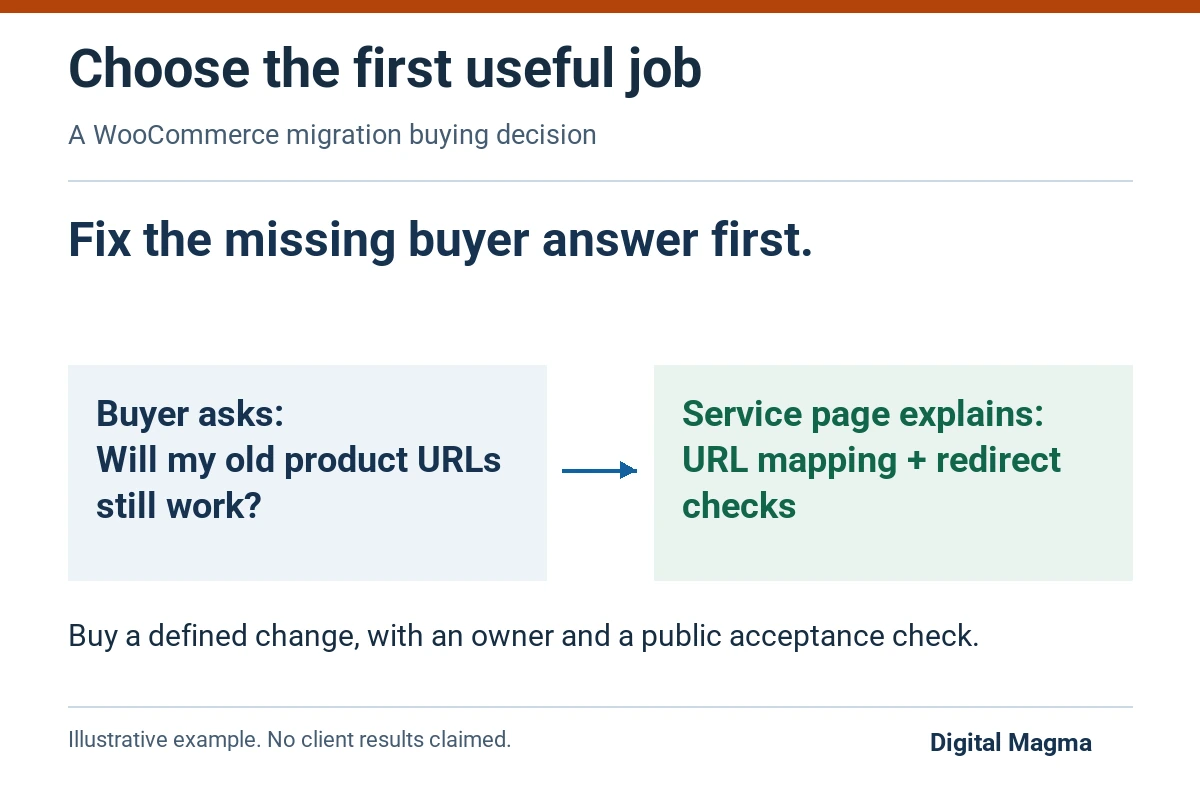
Buyer asks whether old product URLs will work after a WooCommerce migration; the service page explains URL mapping and redirect checks.
Original Digital Magma diagram. Illustrative example. View full-size diagram.

Start with the buyer who cannot find the answer

Imagine you run a software consultancy. One proposal offers twenty AI search articles a month. Another starts by fixing your migration service page. Which should you buy?

The article count cannot answer that. Your prospective customer might already have found the website and still be unable to tell whether you preserve product URLs during a WooCommerce migration. That missing answer belongs on the service page, where the customer is deciding whether to contact you.

Already have a clear service page, but never appear when buyers compare suppliers? Ask the agency to investigate those comparisons. Find out which questions buyers ask, which sources the answers cite and what those sources say about your service.

This is a buying example, not a client result. Its point is simple: the first proposal should explain the problem it will solve before it promises a volume of content.

A brief you can use in the first meeting

“We sell WooCommerce migration services to established shops. Buyers need to know how product URLs and redirects will be handled. Review our service page and show us the first change you would make, who will publish it and how we will check it.”

When does ordinary SEO work need to come first?

Start with access, clear service information and a working enquiry path. Adding another content programme to pages that cannot be fetched or understood gives you more work to diagnose.

Google’s AI search guidance says supporting links in AI Overviews and AI Mode require indexing and snippet eligibility. It does not prescribe special AI markup. That requirement applies to Google; ask for a separate explanation of any other platform in the proposal.

  • Can an anonymous visitor read the main service explanation without a login or button click?
  • Does the page describe who the service suits, what is included and how to ask for a quote?
  • Do enquiries reach the right person, with a record of their source where available?
  • Can someone approve and implement technical or content changes?

If these checks fail, commission the specific repair first. You can still plan AI research alongside it, but keep the responsibilities and budget visible.

How do you compare an AI SEO proposal with an SEO proposal?

Compare the work and the evidence, rather than the acronym in the heading.

Buyer comparison worksheet
QuestionUseful proposal detailFollow-up if missing
Which buyer questions?A named query set with audience and locationAsk which commercial decisions each question represents
Which pages change?Specific URLs and the intended improvementAsk for an example before approving a large content batch
Who implements?Agency or client owner for each taskSeparate recommendations from deployment
What proves delivery?Change log, public checks and source capturesRequest an acceptance test for each deliverable
How is impact measured?Visibility evidence and qualified enquiries reported separatelyAsk how attribution gaps will be disclosed

A supplier can legitimately offer research without implementation. The problem is paying for implementation while receiving a spreadsheet that your team has no time to act on.

What should the first paid project include?

The first project should tell your team what to change and why. A long report that leaves every task waiting for someone else is a poor starting point for a small team.

Agree which buyer questions will be tested and which pages will be reviewed. For each proposed change, the agency should explain the finding, the person who will fix it and the check that confirms it reached the website.

Then settle the practical details. Will the agency publish the copy, or send a document? Does the quote include a developer? Who pays for research tools? Your answers can change the cost and usefulness of the same recommendation.

A manageable first deliverable

One service page, one missing buyer answer, one named person to approve the facts and one public check after publication. Agree the research and writing scope before adding a monthly article target.

This is our suggested starting scope, not a universal package. A larger team with its own developers may need research alone. A founder without development support may need the agency to carry the change through to publication.
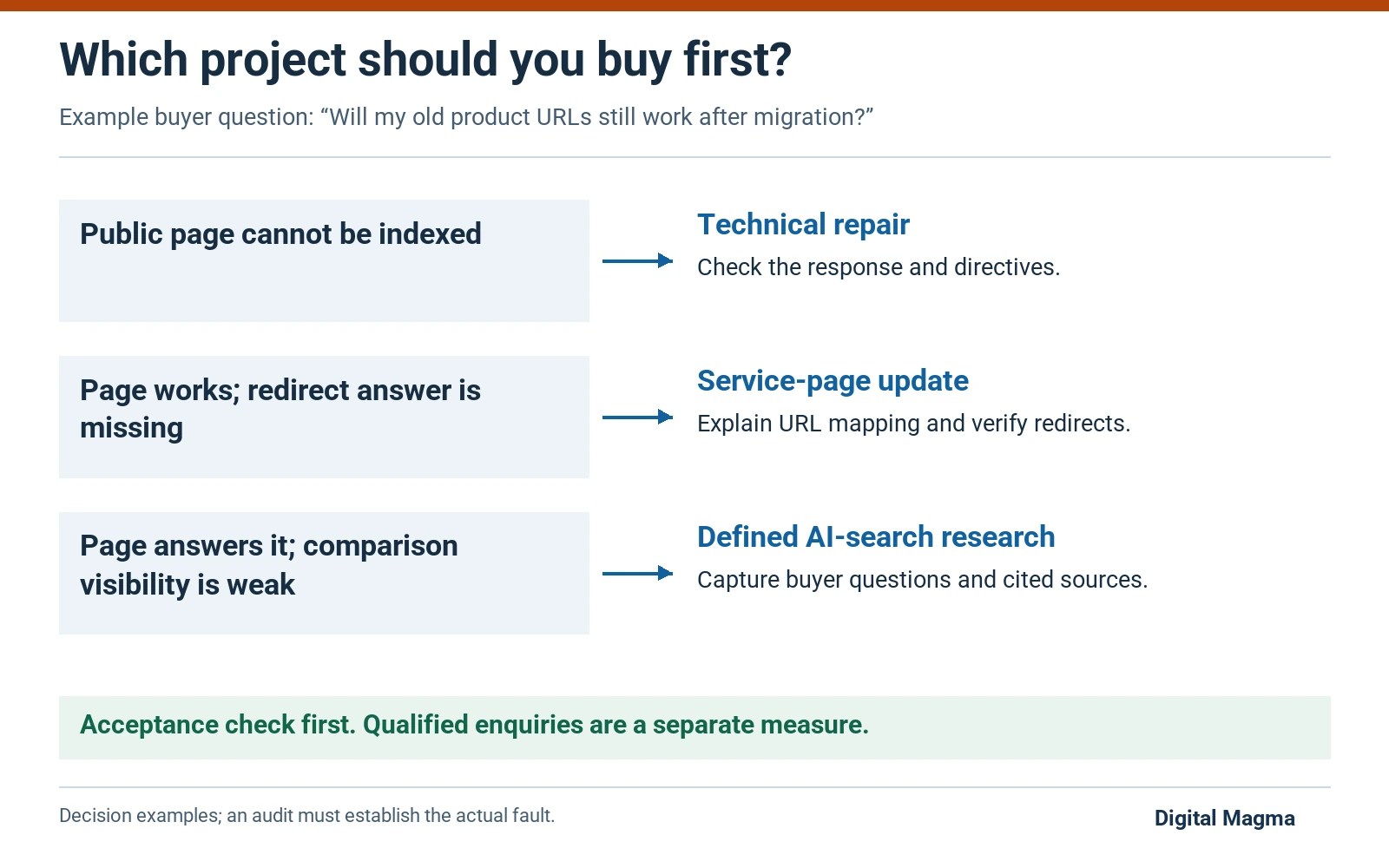
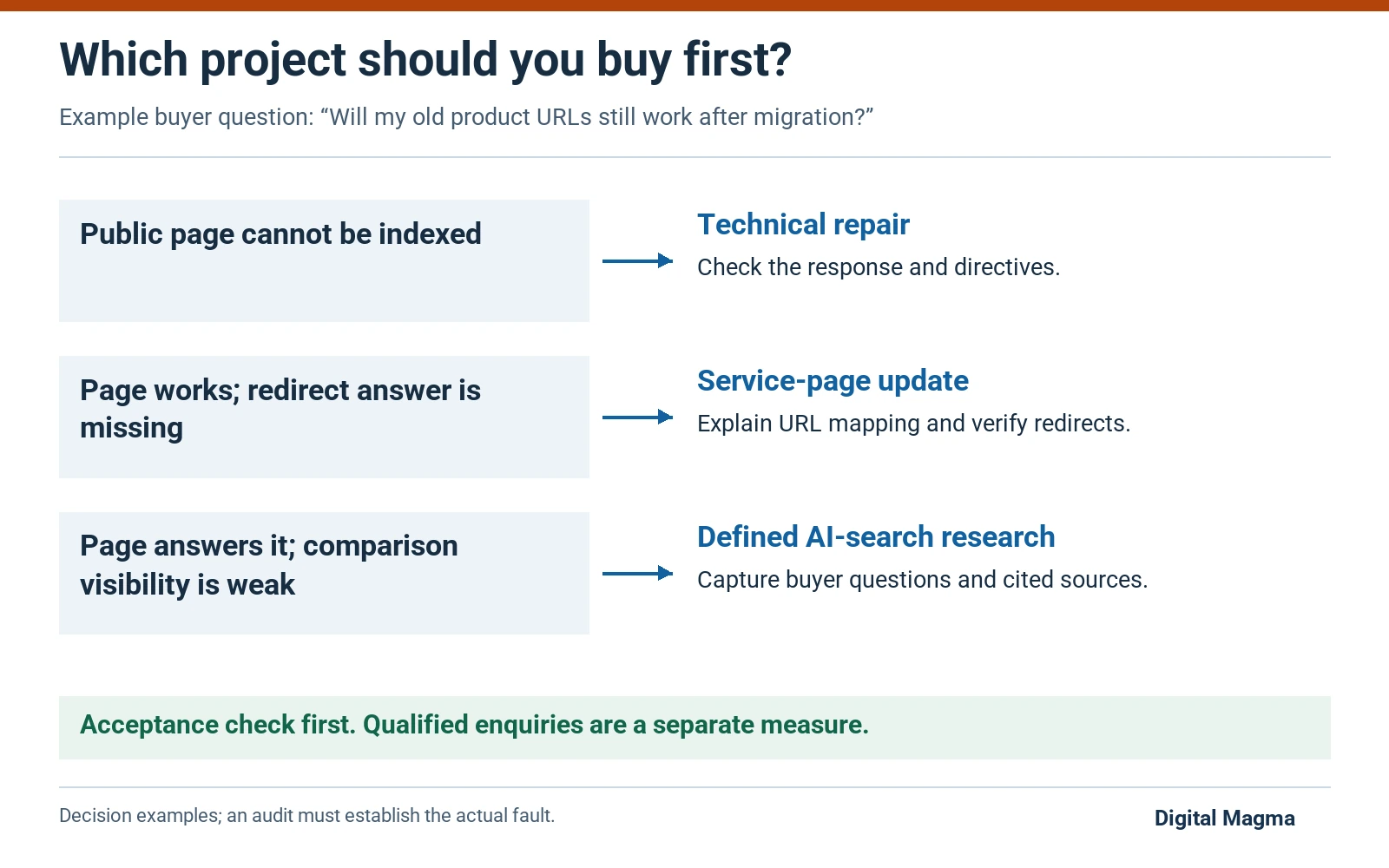
Choose technical repair, service-page clarification or AI-search research from the observed finding.
Match the project to the finding, then assign a public acceptance check. These are illustrative decisions, not client results. View full-size example.

Which evidence should you ask to see?

Ask for evidence that resembles your situation. A screenshot of a brand mention does not establish that a provider can improve your lead quality.

Look at an audit finding beside the change it led to. Then see how the agency checked that change. Private client information may need redaction. A supplier can explain the method without exposing confidential records.

Keep measured outcomes separate from examples. If an agency shows an illustrative report, it should be labelled. If it cites a traffic gain, ask about the date range, starting point, affected pages and other changes that happened during the period.

Use our AI SEO reporting buying guide to define what a mention, citation, visit and enquiry mean before they appear in a contract.

What can make a sensible proposal a poor fit?

A good plan can still be too much for your team to carry out.

A founder-led business with no developer may need implementation support more than another audit. A larger B2B team may have writers already and need help deciding which buyer questions to investigate. Buy the help your team is missing.

Pause if the proposal promises permanent placement, offers no account access, or cannot identify the pages it will change. Also pause if the agency asks you to publish claims your team cannot support. Your website carries those assertions after the engagement ends.

In the buying meeting, ask: “What would you advise us to postpone?” A useful answer shows that the supplier can prioritise within a real budget.

Buyer questions

Can AI SEO replace our existing SEO agency?

It depends on the work your current agency handles. Compare research, technical implementation, content ownership and measurement. Avoid paying two teams to rewrite the same pages without a shared plan.

Should we buy a monthly package immediately?

Start with a defined problem and a clear scope. A recurring package makes sense when the baseline and execution needs are understood, and your team can review the ongoing work.

Is llms.txt enough to make a business appear in AI answers?

A file alone does not establish visibility or citations. Ask which platform the agency is discussing and what actual access, content and answer evidence supports its recommendation.

Sources and editorial method

Technical claims link to primary documentation in the relevant section. Buying worksheets are Digital Magma’s editorial recommendations. Examples are illustrative, not client results. This guide was prepared with AI assistance; no measured search volume or ranking outcome is asserted. Send corrections through our contact page.

About Ankit Sachan

Ankit Sachan is the founder and Head of SEO at Digital Magma, with 10+ years in search and digital marketing. Read his author profile and the agency approach.

Want a first project you can evaluate?

Bring one service page and the proposal you are comparing. We can discuss the missing answer, the implementation work and a sensible first scope.

Discuss Your Project

Explore AI SEO services, compare SEO packages and read Google reviews.

Call +91 79823 19697 · Email us · WhatsApp

Related buying guides

Crawled currently not indexed? Start with these checks

Compare Search Console statuses, inspect canonical signals and use a practical worksheet to investigate pages outside the Google index.

Digital Magma Blog

Technical SEO

Crawled currently not indexed? Start with these checks

Google has crawled your page but has not added it to its index. Before rewriting it, check the recorded crawl date, the canonical URL and what Google actually fetched.

Illustrated indexing dashboard showing crawl status, URL indexing and sitemap checks.
AI-generated editorial illustration. Dashboard figures are illustrative. View full-size illustration.
Diagram: crawled pages are not automatically indexed; indexed pages are not guaranteed search visibility.
Original AI-created infographic: crawling, indexing and search visibility are separate steps.

Crawled currently not indexed: what does it mean?

Crawled currently not indexed means Google visited the URL but has not added it to its search index. Start with the indexed result in URL Inspection: check when Google last crawled the page and which canonical it selected. A green live test checks access today. It cannot tell you whether Google will index the page.

First, decide whether you want this URL in search. Your main service page probably belongs there. A shopping basket or a filter URL that repeats another product listing may not. Fixing the latter just to increase your indexed-page count can send you in the wrong direction.

Google’s Page indexing report says the status can change and there is no need to resubmit an unchanged URL.

The label does not tell you what caused the exclusion. If someone recommends a rewrite immediately, put the page and its inspection result in front of them first. What, exactly, needs fixing?

Which indexing status are you actually seeing?

Read the full status label first. A URL Google has discovered needs a different investigation from one it has already fetched.

Search Console labels and the next useful check
StatusMeaningNext check
Crawled currently not indexedFetched, currently outside the index.Indexed inspection, crawl date, rendered content.
Discovered currently not indexedKnown URL, not yet crawled.Discovery links and server availability.
Alternate page with proper canonicalAn alternate points to an indexed canonical.Confirm the preferred URL is correct.
Google chose a different canonicalGoogle selected another version.Compare both URLs and their signals.
Excluded by noindexA directive excludes indexing.Decide whether the directive is intentional.
Soft 404The page appears missing or empty despite its response.Inspect the actual content and response.

Use the label shown for your exact URL. Similar-looking labels can point to very different next steps.

Why does the live test pass while the page stays unindexed?

The live test checks what Google can fetch now. The indexed result describes the version recorded in Google’s systems. Start with that recorded result.

Copy the exact URL into Google Search Console. Record the indexed result before running a live test. Then note the last crawl date and the Google-selected canonical where it is available. Save both screenshots.

A passing live test is useful: it rules out some current access problems. But it does not run all the checks Google uses to select pages for its index, including duplicate and canonical evaluation. That is why the green result and the indexing exclusion can both be correct.

Check the dates. If Google last crawled the URL before your rewrite, the inspection may still describe the older page.

Google explains these limitations in its URL Inspection documentation. For a single URL, read its inspection details alongside the broader report. Their dates and scope differ.

Is Google choosing another URL as the canonical?

When several URLs contain similar material, Google may choose one to represent them in search. Confirm which one you intended to keep.

Look at the HTML canonical, redirects and internal links together. If a product exists at both a clean address and a tracking-parameter address, link to the version you want indexed. Keep that choice consistent in your sitemap.

Compare the Google-selected canonical with the address you want visitors to find. If they differ, inspect both pages before changing the annotation.

For example, if a tracking URL repeats the clean product page, make your canonical, internal links and sitemap agree on the clean address. If the two pages serve different needs, compare their content before treating them as duplicates.

Do not replace every canonical with the homepage URL. That can confuse the relationship between unrelated pages. Google’s canonical documentation covers redirects, HTML annotations, sitemaps and inconsistent signals.

What should you check on a WordPress page?

Check the page while logged out. Your administrator view can hide a problem that visitors and crawlers still encounter.

Open the published URL in a private browser window. Does it show the full article? Then check the document response, canonical and robots directives. A correct setting in your SEO plugin helps only if the public page delivers it.

  • Confirm the production site is not carrying a staging noindex directive.
  • Check the SEO plugin’s setting for this post and its content type.
  • Inspect the visible content after your page cache and CDN refresh.
  • Check that a security plugin is not returning a challenge or empty response.
  • Follow the published navigation and content links to the page.
  • Verify the primary copy is available in rendered HTML.

A saved change does not always reach the public page immediately. If your editor shows the new version while an anonymous visitor sees the old one, inspect the page cache and CDN response. Another rewrite will leave that delivery problem unresolved.

For JavaScript-heavy pages, inspect the rendered version as well as the initial response. A working interface can conceal missing text from a crawler. Google’s JavaScript SEO guide explains how crawling, rendering and indexing fit together.

Does this page answer anything your other pages miss?

Put this page beside the other article on your site that answers the same question. Can you explain why a visitor needs both?

A city-name swap rarely answers that question. Neither does another 500 words of background. Look for the missing detail: a local constraint, a worked example or the step someone keeps getting wrong.

Add something the reader can use: an observed error, a worked example, a dated source or a decision the existing explanation leaves unresolved. Extra length alone supplies none of those.

Suppose two guides explain exactly how to submit a sitemap. Keep the stronger guide, merge any useful missing details and plan an appropriate redirect if you retire the redundant URL. If they solve separate problems, make the distinction visible in the title, opening answer and internal links.

Keep useful old material. Before consolidating anything, export the content and check its existing traffic, links and business role.

What evidence should you record before choosing a fix?

Write down the observation before deciding what it means. “Google last crawled the old version” is evidence. “The new page is too short” is a guess until you investigate.

Start with the URLs that matter to your business. The hypothetical worksheet below shows how one observation can lead to a specific check. It is not a client recovery report.

Hypothetical diagnostic worksheet
ObservationInterpretationAction to test
Last crawl predates a rewriteThe stored version may be olderCompare old and new output, then monitor recrawl
Canonical points to another productThe preferred URL needs reviewCorrect the unintended signal and related links
Article appears only after a clickPrimary content may be harder to processMake the main explanation available on load
Two pages answer the same query identicallyThey may be redundantChoose a distinct role or plan consolidation
URL has no content links from relevant pagesDiscovery and context can be improvedAdd useful descriptive links from related guides

Keep one row per URL. Record the crawl date, canonical, response status and robots directives, then add what you changed and when. When Google crawls again, you can compare the new result with that record instead of trying to remember what was live last week.

How do you save a useful record of the problem?

Save the document response before changing a setting. A screenshot of the status alone leaves your developer with very little to investigate.

In your browser’s developer tools, open Network and reload the page. Select the main document request rather than an image or stylesheet. Save its final URL, status and response time, along with the date and timezone of your check. Remove cookies and authorization headers before sharing an export.

If present, save the Cache-Control, Age, Content-Type and X-Robots-Tag headers. They can help your developer investigate caching or an indexing directive. To check whether an update reached the public page, compare its canonical and opening paragraph with the copy saved in WordPress.

If your developers use command-line checks, ask them to preserve the redirect chain, HTTP status and response body as separate artifacts. A header-only request cannot tell you whether the article renders correctly. Keep credentials out of screenshots, shared HAR exports and public issue reports.

Link the saved response to the URL’s worksheet row. If a firewall challenge disappears before your developer opens the page, that capture may be the only record of what you saw.

What did our own website check establish?

Our breadcrumb update exposed a useful limit of public website checks: a working page tells you little about whether Google has selected it for search.

On 4 October 2026, Digital Magma checked 145 sitemap-linked URLs, including the homepage, during its breadcrumb update. All returned HTTP 200, and every non-home URL contained BreadcrumbList markup. This was a public HTTP audit, not a fresh Search Console indexing export.

So we could confirm the responses and markup. We could not use that result to claim 145 indexed pages. That would require current Search Console evidence.

When should you request another crawl?

Request a crawl after publishing a new page or making a meaningful correction. The request tells Google there is something to fetch, without deciding whether it belongs in the index.

Once the page is accessible and the change is worth recrawling, use URL Inspection for an individual address. Use an updated sitemap to communicate a collection of new or revised URLs. Keep modification dates truthful.

Keep a dated record of the change. Google’s recrawl guidance says crawling can take days to weeks and repeated requests do not speed it up. There is no acceptance deadline.

When the next crawl appears, compare its date with your update. If it happened earlier, give Google time to fetch the revised page before judging the result.

Crawled currently not indexed: common questions

These answers address the decisions that usually come up after the first inspection.

Does this status mean Google penalised my site?

The status does not by itself diagnose a penalty. Check Search Console’s Manual Actions and Security Issues reports separately, then investigate the URL’s indexed inspection details.

Will a longer article fix it?

Extra length alone does not establish usefulness. Add information that helps the visitor complete the task, remove redundant copy and compare the page with competing or overlapping content.

Why is the live test green when the page is not indexed?

The live test can fetch and process the page now. It does not perform every indexing check, including duplicate and canonical evaluation. Check the indexed inspection result separately.

Should every filter URL be indexed?

Index only the useful search destinations you intend to maintain. A parameter combination with no distinct value may belong outside the index. Review canonical and crawling behaviour before changing large URL sets.

Can structured data force indexing?

Structured data describes eligible content. It does not override Google’s index selection or guarantee a rich result, ranking or AI citation.

Sources, author and how this guide was prepared

This guide uses Google’s documentation and the dated public-site check described above.

Research also reviewed public Reddit questions about conflicting reports and ecommerce parameters. Community explanations were treated as questions to verify, not technical authority. English, Russian and Chinese versions of Google’s recrawl guidance were cross-checked. No third-party article was translated into this post.

AI tools assisted the research and drafting. The technical references are linked above, the worksheet is hypothetical, and our site observation covers only the public checks described in that section. Found an error? Send it through our contact page.

About Ankit Sachan

Ankit Sachan is the founder and Head of SEO at Digital Magma, with 10+ years in search and digital marketing. His background includes technical SEO and international campaigns. Read his author profile and the agency approach.

Need help deciding what to change?

Digital Magma can review crawled currently not indexed URLs alongside your Search Console evidence and public-page responses.

Bring the affected addresses and their inspection details. Start with a Discuss Your Project, see our SEO services or compare published SEO packages. Read Google reviews before choosing a provider.

Call +91 79823 19697, email contact@digitalmagma.com or message on WhatsApp. Digital Magma will explain the indexing evidence and the proposed work. No fixed indexing date or ranking is promised.