
Ecommerce SEO
What should an ecommerce AI search audit include before you hire an agency?
A store can look correct while its product feed says something else. Use one product to test the audit before you pay for a catalogue-wide project.
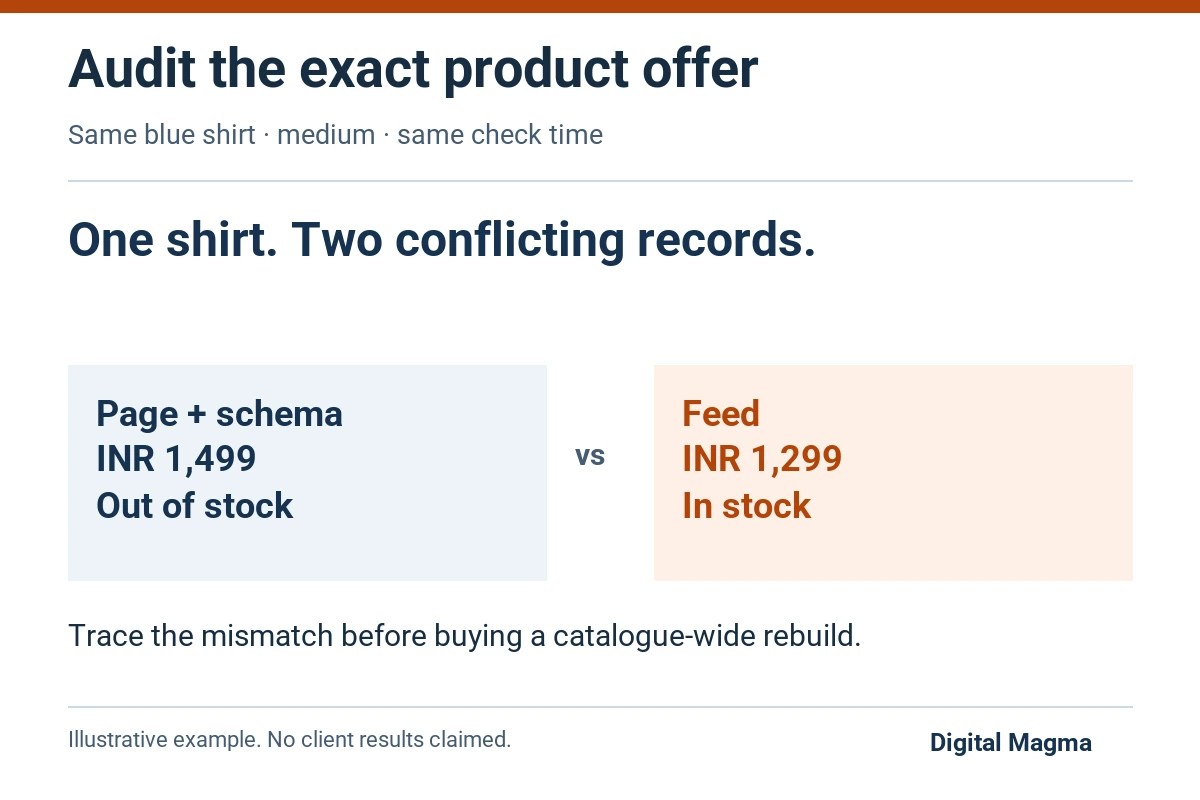
An ecommerce AI search audit should check whether your product page, structured data and feeds describe the same product correctly. It should also test the buyer questions you agreed to investigate. You need a list of specific problems and fixes, with evidence for each one. Brand mentions alone cannot show whether a price or stock state is right.
Follow one product before auditing the whole catalogue
Suppose your blue shirt in medium costs ₹1,499 and is out of stock. The product page shows both correctly. Its structured data agrees. Your shopping feed still lists ₹1,299 and “in stock”.
Now the catalogue team has something to investigate. A report that says “your shop needs more AI visibility” leaves them guessing.
In this hypothetical example, the next job is to trace the feed’s price and stock values to their source. Check the export time first. Then check whether the feed uses the parent product while the page shows the selected size. Those are questions to investigate, not conclusions to put in a report without checking.
Start the sample with products that expose these differences: a variant, an unavailable item, a recently changed price or an unusual shipping condition. A homepage-only audit will miss most of them.
Keep the SKU, size, colour, destination market and check time beside each finding. “Wrong stock” becomes a useful task only when someone else can reproduce it.
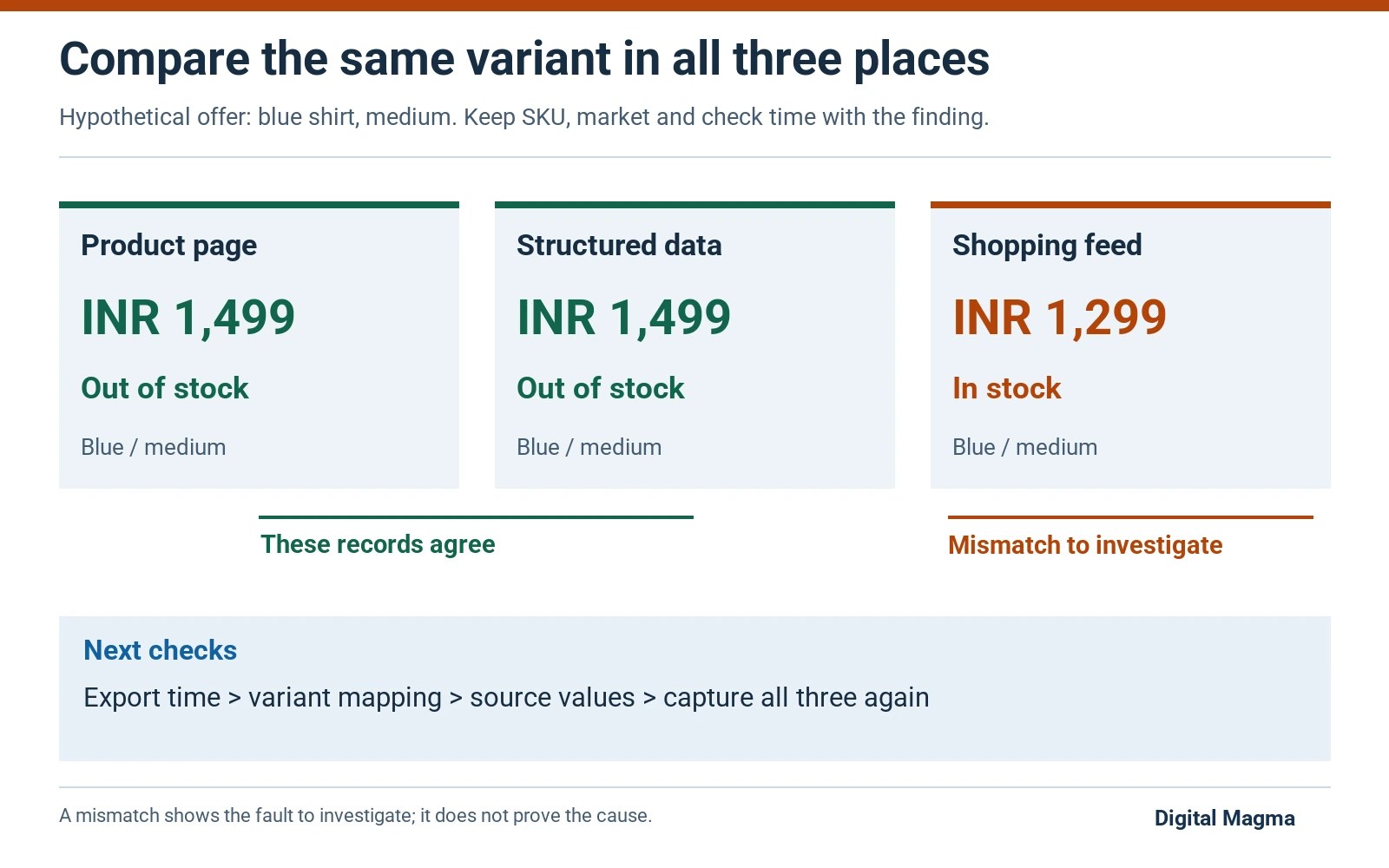
Do the page, schema and feed agree?
Compare the same offer. A medium blue shirt and a large blue shirt can have different prices or stock, so record the selected variant before comparing the page with its feed.
Google explains two routes for rich product data: product structured data and Merchant Center feeds. Providing both can broaden eligibility and help Google verify product information. That is Google’s guidance. Other assistants may use different sources.
| Field | Evidence to compare | Owner to identify |
|---|---|---|
| Price and currency | Selected offer on page, markup and destination feed | Pricing or feed manager |
| Availability | Variant stock state and update timestamps | Inventory integration owner |
| Identity | SKU and applicable identifiers across records | Catalogue team |
| Variant | Size, colour and specific landing URL | Store developer |
| Shipping and returns | Visible policy and supported structured fields | Operations team |
Do not “fix” the audit by changing only the markup while leaving the price a shopper actually sees unchanged. Find the source of the mismatch.
What does an out-of-stock recommendation prove?
It proves that the captured answer and the checked availability disagree. It does not by itself identify the source or age of the assistant’s information.
Here is a hypothetical test: a shopper asks for a blue shirt in medium, and an assistant recommends the product while that variation is unavailable. Save the question, complete answer, visible source links, selected variant and time. Then check whether the page, schema and feed all showed the current state.
If the page, markup or feed was wrong, fix that record first. If the data agreed, inspect the cited source and any platform-specific retrieval documentation before blaming the feed. The assistant may have used another page or older information.
An audit should state the limit of the finding. “This answer was stale in this test” is defensible. “Every AI platform ignores your stock feed” requires much broader evidence.
What should the technical access check cover?
Check the exact product URL as an anonymous visitor and save what the page returned.
- A product URL that returns HTTP 200 and names the correct canonical.
- Robots directives and any CDN or firewall challenge affecting the agreed crawler.
- Product description, price and stock available in the delivered or rendered page.
- Useful internal links from category and related product pages.
- Structured data that agrees with the selected product.
A plugin setting is only a starting point. Open the product and compare what it shows with Google’s Merchant Center structured-data requirements, including the price and availability for the selected offer.
For an indexing exclusion, use the crawled currently not indexed guide before changing the whole catalogue.
How do you define acceptance before paying?
Another person on your team should be able to open the product, choose the recorded variant and see why the finding matters. If they cannot, the report needs more detail.
What a useful finding looks like
Product: blue shirt, medium, the recorded SKU and URL.
Observation: page and schema show ₹1,499 and unavailable. The feed shows ₹1,299 and available.
Next check: compare the export time and the variant-to-feed mapping.
After a fix: capture all three records again for that same variant.
This follows the hypothetical example above. The cause still needs checking. A stale export and a plugin bug are possible explanations, but this mismatch alone cannot tell you which one happened.
Give product accuracy to the person who owns the catalogue or operations policy. A marketer can improve a returns explanation, but should not invent the return window. Valid markup can describe an incorrect policy just as easily as correct one.
For a large catalogue, test the proposed rule on a normal product and an awkward variant before applying it everywhere. Keep the old mapping so your team can reverse an unintended change. Treat this pilot as part of the scope, with its own approval.
What belongs outside the first audit?
A new checkout integration, an inventory-system replacement and a broad content programme are separate projects unless the agreement explicitly includes them.
Ask for these costs to be itemised. You may only need to correct a feed mapping or a product template. Paying for a full rebuild before tracing the mismatch makes the decision harder to assess.
Likewise, a presence report cannot prove sales attribution. The audit can capture what an assistant said, what it cited and which factual errors appeared in the sample. Orders and qualified enquiries require their own measurement evidence.
Use this scope to compare suppliers on the same job. The lowest quote is less helpful when one proposal includes fixes and another ends at recommendations.
Buyer questions
Does Product schema guarantee AI recommendations?
Product markup describes your offer and can support eligible search appearances. It does not guarantee an AI recommendation, a citation or a sale.
Can the same audit cover every country?
Market differences can change currency, availability, shipping and the buyer question. Specify the markets in the scope and test the appropriate landing pages and feeds.
Should we share our entire customer database for this audit?
A public product-data audit usually starts with catalogue and page evidence. Ask why any non-public data is needed and agree a limited access scope before sharing it.
Sources and editorial method
Technical claims link to primary documentation in the relevant section. Buying worksheets are Digital Magma’s editorial recommendations. Examples are illustrative, not client results. This guide was prepared with AI assistance; no measured search volume or ranking outcome is asserted. Send corrections through our contact page.
Have a product-data mismatch to investigate?
Bring the product URL, selected variant and the records that disagree. We can discuss which part of the store or feed needs investigation.
Request an initial website review
Explore SEO services, compare SEO packages and read Google reviews.