
AI search glossary
What Is Schema Markup, and Does It Still Matter for AI Search?
Plugins add schema to almost every site now, often more than anyone checks. This entry separates the Schema.org vocabulary from what Google actually supports, and reports what Google says about schema and AI search in 2026.
What is schema markup? The short answer
Schema markup is structured data, usually written in JSON-LD, that labels what a page is about using the Schema.org vocabulary: an organisation, a product, an article, a person. Search engines read it to understand the page, and Google uses certain types to show rich results. It must describe content visible on the page.
Key takeaways
- Schema.org defines hundreds of types. Google supports a much shorter list for rich results.
- Google recommends JSON-LD where your setup allows it.
- Google says structured data “isn’t required” for its generative AI search features.
- FAQ rich results stopped appearing in Google Search from 7 May 2026.
- Markup has to match what visitors can see, or it breaks Google’s guidelines.
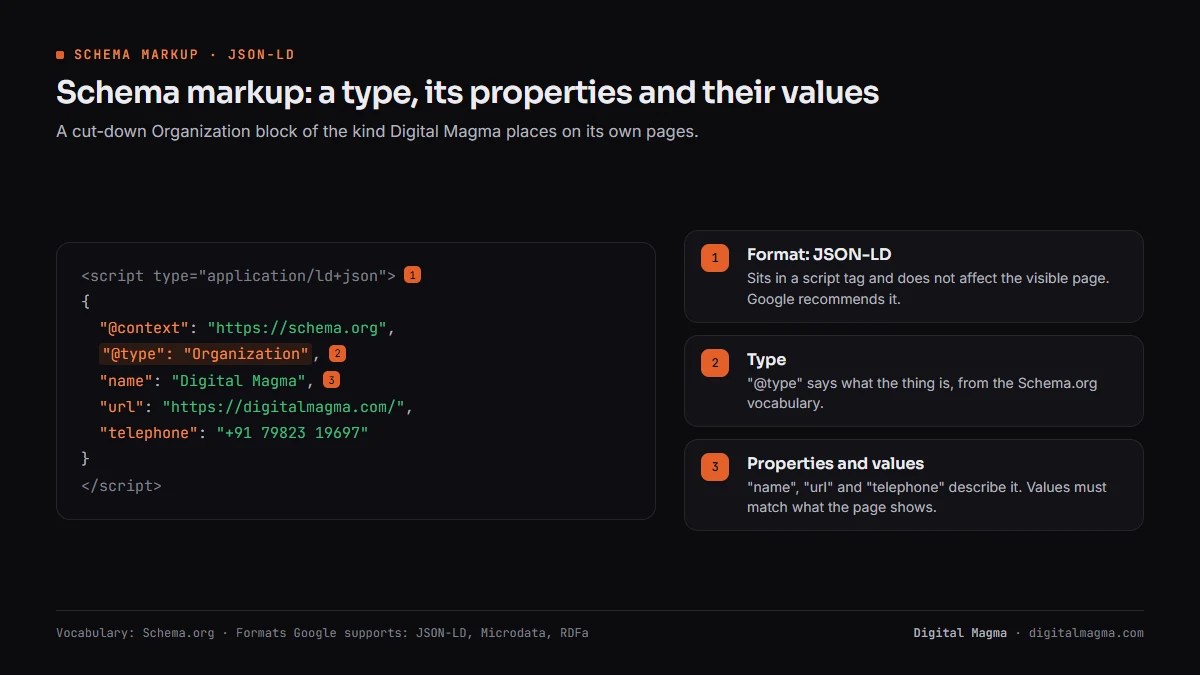
Schema markup basics: types, properties and JSON-LD
Schema markup has three parts: a type that says what the thing is, properties that describe it, and a format that carries both. The vocabulary comes from Schema.org, a shared project. The format is usually JSON-LD, placed in a script tag where it does not affect the visible page.
Here is a cut-down Organization block of the kind Digital Magma places on its own pages:
<script type="application/ld+json">
{
  "@context": "https://schema.org",
  "@type": "Organization",
  "name": "Digital Magma",
  "url": "https://digitalmagma.com/",
  "telephone": "+91 79823 19697"
}
</script>
“@type” is the type. “name”, “url” and “telephone” are properties. Their values must match what the page shows.
Google’s introduction to structured data lists three supported formats: JSON-LD, Microdata and RDFa.
Microdata and RDFa sit inside HTML attributes, next to the visible text. Google recommends JSON-LD, calling it easiest to implement and maintain at scale.
Larger sites add one more idea: the “@id”. It gives a thing a stable identifier, so other blocks can point to it instead of repeating it.
On Digital Magma’s site, every page refers to the same Organization and founder by @id. A service page then says “provided by” that organisation without redefining it, and the whole site describes one consistent business.
Schema markup types most business sites need
Schema markup for a typical business site needs only a handful of types, chosen by page purpose. Start with who you are, then what each page offers. Adding every type a plugin suggests rarely helps, because Google only acts on supported types whose content actually appears on the page.

| Type | Page | Google rich result? |
|---|---|---|
| Organization | Home or about page | Yes, knowledge panel and attribution details |
| LocalBusiness | Business with a physical location | Yes, local business details |
| Product | Product pages | Yes, price, availability, reviews |
| Article | Blog posts and news | Yes |
| BreadcrumbList | Any page with breadcrumbs | Yes |
| Person | Author and team pages | Through Profile page markup |
| Service, FAQPage | Service pages, question blocks | Not in Google’s current gallery |
Unsupported does not mean useless. Service and Person markup still state relationships clearly, which helps describe an entity consistently.
Schema.org types vs Google rich results: what Google actually supports
Schema.org types and Google rich results are two different lists, and confusing them wastes effort. Schema.org is a broad vocabulary any site may use. Google’s search gallery lists only the features Google Search supports, each with its own required properties.
The gallery, last updated 16 October 2026, includes Article, Breadcrumb, Event, Local business, Organization, Product, Profile page, Recipe, Review snippet, Speakable and Video, among others.
FAQ is gone from it. Google’s August 2023 post first limited FAQ rich results to well-known government and health sites.
How-to rich results went the same way. By 13 September 2023 Google showed them on neither mobile nor desktop.
Then the Search Central changelog recorded that FAQ rich results would no longer appear from 7 May 2026, and the documentation was removed.
Google’s 2023 advice still applies to leftover markup. Unused structured data “does not cause problems for Search”, but has no visible effect either.
Schema markup and AI search: what Google says
Schema markup is not required for Google’s AI features, according to Google itself. Its guide to generative AI search says structured data “isn’t required” and that no special schema.org markup is needed. Google still recommends using it as part of normal SEO, because it supports rich result eligibility.
The source is Google’s guide to optimizing for generative AI features. It lists “overfocusing on structured data” among things you can ignore.
Google’s AI features page adds one firm rule. Structured data must match the visible text on the page.
So schema is no ticket into AI Overviews. What it does is state facts plainly: who runs the business, where it operates, what it sells.
Digital Magma uses it that way. Our pages carry the same Organization and founder identifiers everywhere, so every page describes the same entity.
Other AI systems publish no schema rules of their own. Treat claims of a special “AI schema” with suspicion.
For a buyer-focused answer, see does schema help AI search?
Schema markup: how to add and test it (5 steps)
Schema markup goes on in five steps, and testing is the step most sites skip. Pick the type, fill only true properties, publish, validate, then watch Search Console. A CMS plugin can handle the first three, but nobody should trust its output without the last two.
- Choose the main type. Match it to the page purpose, using Google’s gallery for rich result types.
- Fill required properties. Each gallery page lists them. Leave out anything the page does not show.
- Add JSON-LD. Place it in the page HTML, or use your CMS’s structured data setting or plugin.
- Validate. Run the Rich Results Test for Google features and the Schema Markup Validator for general syntax.
- Monitor. Search Console’s rich result reports flag errors across the whole site.
Google’s structured data guidelines apply on top of syntax. Valid code can still break policy.
Schema markup in our client work
Schema markup in Digital Magma’s client work supports pages that already earn their visibility. For a Canadian welding equipment manufacturer with 40+ keywords in Google’s top 10 and visibility in AI Overviews and ChatGPT, the ranking strength comes from the pages themselves. Markup only restates their facts consistently.
That order matters when budgets are tight. Fix weak pages first, then mark up the facts they contain.
For a Toronto ENT clinic, the facts worth stating are the practical ones: location, services and doctors, each matching the visible page.
For an app development company selling in six countries, one Organization identity runs across every country page, so the brand reads as one entity.
Schema markup mistakes that waste effort
Schema markup mistakes mostly come from adding markup for its own sake. Plugins stack overlapping blocks, writers add properties the page never shows, and teams chase rich results Google has retired. Each of these costs time, and some break Google’s guidelines outright.
- Marking up hidden content. Google says not to describe information that is not visible to users.
- Chasing FAQ stars. FAQ rich results no longer appear in Google Search.
- Duplicate graphs. Theme plus plugin plus custom code can produce three conflicting Organization blocks.
- Self-serving reviews. Google’s review snippet guidelines allow LocalBusiness and Organization reviews only on sites that review other businesses.
- Placeholder pages. Google warns against blank pages made just to hold structured data.
- Never retesting. Theme and plugin updates change output. Recheck after each one.
Digital Magma treats deletion as part of the job. A smaller graph that agrees with the page beats a large one that contradicts it.
Schema markup: frequently asked questions
Schema markup questions from site owners and junior SEOs.
What is schema markup in SEO?
It is structured data that labels what a page contains, using Schema.org types and properties. Google uses it to understand pages and to show supported rich results.
Does schema markup help SEO?
It can make pages eligible for rich results, which change how listings look. Google does not promise rankings from it, and eligibility never guarantees a rich result.
Does schema markup help AI search?
Google says structured data is not required for its generative AI features and no special markup is needed. It still recommends schema for rich results and accurate understanding.
Which format is best: JSON-LD, Microdata or RDFa?
Google supports all three and recommends JSON-LD when your setup allows it, because it is easier to implement and maintain at scale.
How do I test schema markup?
Use Google’s Rich Results Test for Google features and the Schema Markup Validator for general Schema.org syntax. Then watch Search Console’s reports.
Is a schema markup generator safe to use?
Generators are fine for a first draft. Check every value against the visible page and run the output through the Rich Results Test before publishing.
Does schema markup guarantee rich results?
It does not. Valid markup makes a page eligible, and Google decides whether to show the feature.
Why did FAQ rich results disappear?
Google cut them back in August 2023 to government and health sites, then stopped showing them in Search from 7 May 2026.
Schema markup that matches your pages
Digital Magma audits schema markup, removes conflicting blocks and adds accurate JSON-LD that matches each page. See our AI SEO service or book a free SEO audit.
No rich result is guaranteed. Call +91 79823 19697, email contact@digitalmagma.com or message on WhatsApp (Mon–Sat, 9 am–9 pm IST). Our Google reviews are open to read.