
AI search glossary
What Is Speakable Schema, and Should a Non-News Site Use It?
Schema plugins and competitor markup often include SpeakableSpecification, sold as “voice SEO”. This entry quotes Google’s actual limits, shows a working example, and gives an honest answer for service businesses.
What is speakable schema? The short answer
Speakable schema is structured data that marks the parts of a page best suited to being read aloud by text-to-speech. Google uses it, as a beta feature, to let Google Assistant read short sections of news articles on smart speakers. It currently works only for US users with English-language Google Home devices and English-language publishers.
Key takeaways
- Speakable is a Schema.org property. Its value is a SpeakableSpecification.
- Google lists it as a beta feature for news content, in the News category of its search gallery.
- Availability: US users, Google Home set to English, English-language publishers.
- Point to sections with cssSelector or xPath, never both.
- Google documents no effect on AI Overviews or rankings.
Speakable schema mechanics: cssSelector and xPath
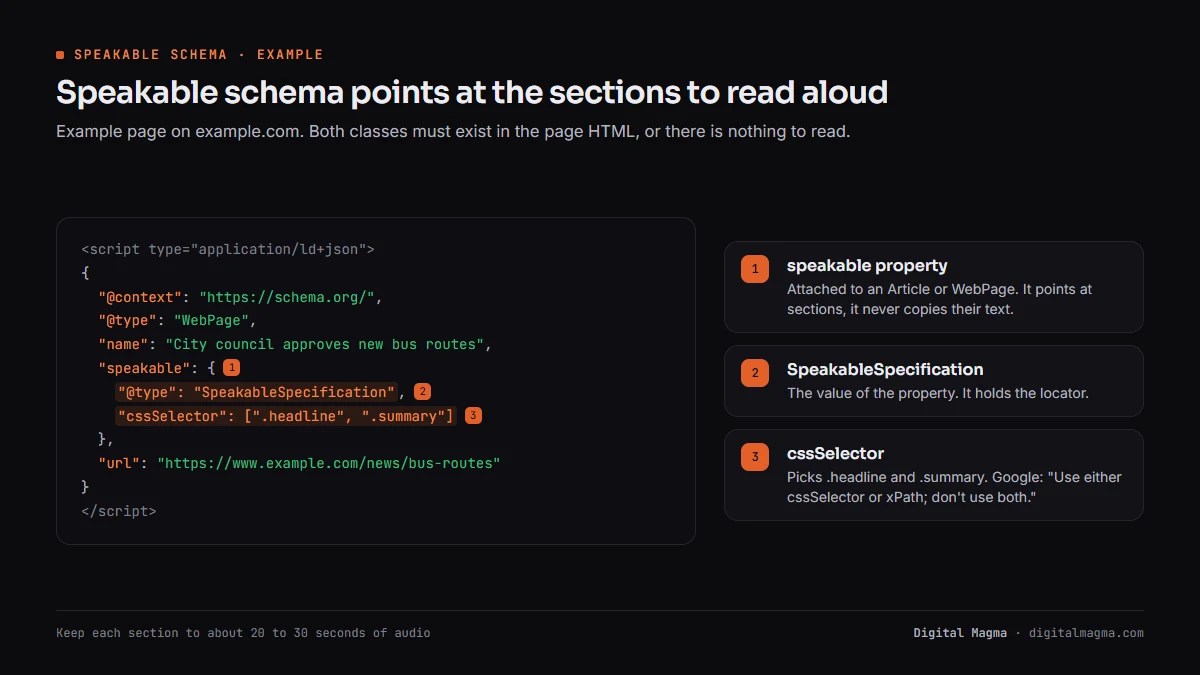
Speakable schema works by pointing at parts of a page rather than copying their text. You attach a speakable property to an Article or WebPage, and its SpeakableSpecification uses a locator to say which sections a voice assistant may read. Google accepts two kinds of locator: CSS selectors and XPath expressions.
cssSelector picks elements the way a stylesheet does, for example by class name. It is the easier choice for most sites.
xPath addresses nodes in an XML view of the page. Google’s own example points at the title tag and the meta description.
Google’s Speakable (BETA) documentation is firm on one rule. “Use either cssSelector or xPath; don’t use both.”
Schema.org’s speakable property page lists a third method, plain id references to page elements. Google’s documentation names only the two selector types.
The property can repeat. Schema.org says it “can be repeated an arbitrary number of times”, so one page may mark several short sections.
The selected text must exist on the visible page. Speakable describes content that is already there and never supplies text of its own.
Digital Magma prefers cssSelector for that reason. A class name such as .summary survives most template edits, while an XPath tied to exact element positions breaks when a block moves.
Speakable schema availability today: beta, US English and news
Speakable schema has a narrow documented scope, and Google says so plainly. The feature is in beta and “subject to change”. Google Assistant uses it to answer topical news queries on smart speakers, and only for US users whose Google Home devices are set to English, from English-language publishers.

Here is how it behaves when it does apply. A user asks for news on a topic, and Google Assistant returns up to three articles from around the web.
It reads the speakable sections aloud, attributes the source, and sends the full article URL to the user’s phone through the Google Assistant app.
Google says it hopes to expand to other countries and languages once enough publishers adopt the markup. It gives no date.
Google’s search gallery files Speakable under News. Its description mentions “news content to read aloud”.
Speakable schema example in JSON-LD
Speakable schema is short to write. The example below marks a page’s headline and its summary paragraph using CSS selectors, which matches Google’s advice to highlight key points rather than whole articles. Adjust the selectors to your own template, then test the page before publishing.
<script type="application/ld+json">
{
  "@context": "https://schema.org/",
  "@type": "WebPage",
  "name": "City council approves new bus routes",
  "speakable": {
    "@type": "SpeakableSpecification",
    "cssSelector": [".headline", ".summary"]
  },
  "url": "https://www.example.com/news/bus-routes"
}
</script>
Both classes must exist in the page HTML. If the selector finds nothing, there is nothing to read.
Keep each marked section brief. Google recommends around 20 to 30 seconds of audio per section, roughly two to three sentences.
Write those sentences for the ear. Google suggests rewriting the top of a story into separate, clear sentences when it will be read aloud.
Then open the live page and confirm each selector really returns the text you meant. Digital Magma recommends doing this in the browser console, because a validator only confirms syntax, not that the target exists.
Validate the JSON-LD with the Schema Markup Validator. Google’s documentation offers general structured data troubleshooting resources too.
Speakable vs FAQ, HowTo and other answer markup
Speakable differs from FAQ and HowTo markup in what it describes. FAQPage and HowTo labelled the structure of content, questions with answers or steps in order, mainly to earn visual rich results. Speakable labels which passages suit audio. Today, Google shows neither FAQ nor How-to rich results.
| Markup | What it marks | Google status (October 2026) |
|---|---|---|
| Speakable | Sections fit for text-to-speech | Beta, US English news only |
| FAQPage | Questions and answers | Rich result no longer shown from 7 May 2026 |
| HowTo | Ordered steps | Rich result dropped in September 2023 |
| Q&A page | One question with user answers | Supported in Google’s gallery |
The FAQ and How-to history comes from Google’s August 2023 blog post and the Search Central changelog.
None of these is required for AI Overviews. Google’s generative AI guide says no special schema.org markup is needed.
Digital Magma still writes every page with a short answer under each heading. That habit serves readers, voice assistants and AI answers alike, whatever markup sits on top.
Speakable schema for a non-news business: should you use it?
Speakable schema gives a non-news business no documented Google benefit today. Google describes it only for news content, US English users and English publishers. A clinic, manufacturer or agency outside that scope should not expect voice traffic, AI Overview placement or ranking gains from adding it.
That does not make it harmful. Correct markup that Google does not use simply has no effect, as Google said of unused FAQ markup in 2023.
So the decision is about cost. If your schema tool adds it with no effort, leaving it in place costs nothing.
If adding it means developer time, spend that time elsewhere. Organization, Product or LocalBusiness markup has documented uses.
The one side benefit is discipline. Choosing a two-to-three-sentence summary worth reading aloud tends to sharpen the opening of a page.
Be wary of anyone selling speakable as “voice SEO” for an Indian or non-news site. Google’s documentation does not support that claim.
When Digital Magma audits a non-news site, speakable sits at the bottom of the schema list. Broken Organization data, missing Product details or conflicting duplicate graphs come first.
Speakable schema in our client work and on our own site
Speakable schema appears on Digital Magma’s own pages, and we say openly why. Our markup includes a SpeakableSpecification with a cssSelector for the page heading. It costs nothing to keep, and outside US English news we expect no documented Google effect from it.
For clients, it is never a priority. A Canadian welding equipment manufacturer with 40+ keywords in Google’s top 10 earned its AI Overviews and ChatGPT visibility through its pages.
A Toronto ENT clinic sits outside the US market the feature covers. Speakable would do nothing there today.
For an app development company selling in six countries, only US English news content could qualify. Product and service pages fall outside it.
Speakable schema mistakes
Speakable schema mistakes usually come from treating it as a ranking trick rather than an audio hint. Google’s guidelines list what should and should not be marked, and most errors break one of them. Others come from selectors that no longer match the page after a redesign.
- Marking the whole article. Google advises focusing on key points, so the readout does not cut off details.
- Marking confusing text. Google says to skip datelines, photo captions and source attributions.
- Using both locators. Pick cssSelector or xPath for a specification, not both.
- Broken selectors. A theme update renames a class and the markup points at nothing.
- Expecting AI Overview gains. Google documents no link between speakable and AI features.
- Ignoring the scope. Outside US English news, Google documents no use for it.
Speakable schema: frequently asked questions
Speakable schema questions from developers and SEO teams.
What is speakable schema used for?
It marks page sections suited to text-to-speech. Google Assistant uses it to read parts of news articles aloud for topical news queries on smart speakers.
Is speakable schema still supported by Google?
Google’s documentation, last updated 8 September 2026, still lists it as a beta feature, and the search gallery includes it under News.
Does speakable schema work in India?
Google documents it only for US users with Google Home set to English. It has no documented effect for Indian users today.
Can I use speakable on a service page?
You can add it to any WebPage, and Schema.org allows that. Google only describes using it for news content, so expect no Google effect.
Does speakable help AI Overviews?
Google does not say so. Its generative AI guide says no special schema.org markup is needed for its AI features.
Should I use cssSelector or xPath?
Either works, but Google says not to use both in one specification. Most teams find cssSelector easier to maintain.
Is there a speakable schema generator?
Many schema plugins and generators output it. Check that each selector matches real text on the page, then validate the JSON-LD.
Speakable schema and the markup that matters more
Digital Magma checks speakable schema along with the structured data that has documented uses, and fixes what is broken or wasted. See our AI SEO service or book a free SEO audit.
No rich result is guaranteed. Call +91 79823 19697, email contact@digitalmagma.com or message on WhatsApp (Mon–Sat, 9 am–9 pm IST). See our Google reviews for client feedback.